WhatsApp Chatbot for Hospitals: 7 Use Cases & Limits
- A WhatsApp chatbot for hospitals automates appointment booking, reminders, front-desk queries, and prescription follow-ups on a channel patients already use daily.
- Reminder sequences perform best as a multi-touch cadence across the week before a visit — the research on this is specific enough to plan against, not just directionally true.
- Meta’s own WhatsApp Business Policy restricts using the platform for telemedicine or health information when local regulations require that information to be handled by systems built for it — the restriction is conditional, not blanket, and hospitals need to know which condition applies to them.
- Diagnoses, medications, and lab results stay out of message bodies. Redirect patients to a secure portal or a phone call instead.
- The most defensible hospital chatbots handle logistics and routing. They don’t perform symptom triage or offer medical advice.
A WhatsApp chatbot for hospitals is an automated messaging layer, built on the WhatsApp Business API, that handles appointment bookings, reminders, front-desk questions, and prescription follow-ups without pulling a staff member into every conversation.
Front desks are still buried in the same repetitive calls: confirming appointment times, answering OPD timing questions, checking whether a report is ready. Each of those is a task a chatbot can handle correctly, every time, at any hour.
This matters now because patients already default to WhatsApp for nearly every other kind of communication and expect the same convenience from a clinic.
Setting this up well takes more than turning on auto-replies.
It starts with a properly configured WhatsApp Business API for healthcare, built with the right templates, escalation points, and boundaries around what a bot should and shouldn’t say, and a working understanding of the platform mechanics that decide what’s even possible.
This article walks through seven use cases that hold up in practice, the mechanics behind each, and where the boundaries sit and why.
How a Hospital WhatsApp Chatbot Actually Works
WhatsApp chatbot for hospitals: an automated messaging system, running on WhatsApp Business API, that recognizes what a patient needs and either answers directly or routes the conversation to staff.
The flow is consistent across most implementations:
- Patient sends a message. They message the hospital’s verified WhatsApp number, often just “Hi” or a specific request.
- The system identifies intent. It determines whether the patient wants to book, reschedule, ask a question, or get an update.
- It responds or requests details. For simple requests, it answers directly from pre-approved templates. For bookings, it collects the necessary details.
- Complex cases route to a person. Anything outside the bot’s defined scope, especially anything clinical, gets handed to staff.
- The action is logged. Bookings, cancellations, and updates sync back to the hospital’s scheduling or HMS system.
One mechanic decides what’s legally sendable at each step: WhatsApp’s 24-hour customer service window.
Once a patient messages the hospital, the business can send free-form replies for 24 hours.
Outside that window, every business-initiated message — a reminder, a report-ready alert, a refill nudge — must use a pre-approved template, categorized by Meta as Utility, Marketing, or Authentication.
Utility templates (appointment reminders, order updates) get more lenient delivery treatment than Marketing ones, which is why almost every use case below is built as a Utility template rather than free text.
This single mechanic is why hospital deployments feel rigid compared to a live chat widget — and why template design, not conversational flexibility, is where most of the implementation effort actually goes.
This pattern holds whether the deployment is a single clinic or a multi-branch hospital group. What changes is the number of templates and how deep the system integration runs.
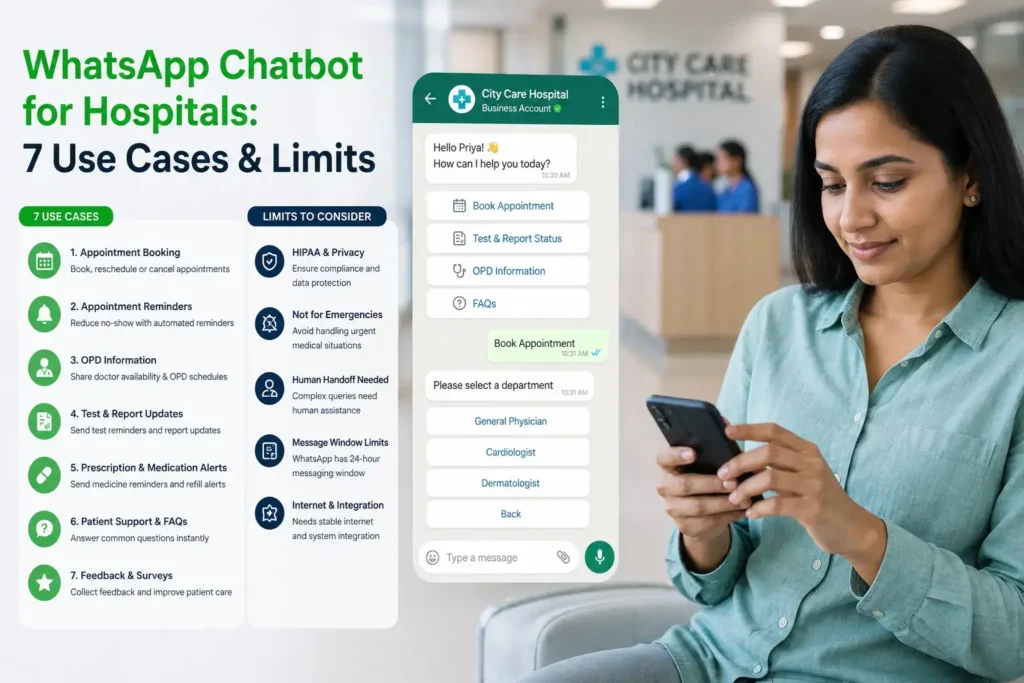
Use Case 1: Appointment Booking & Reminders
Self-service booking via chat. Patients pick a department, see available slots, and confirm a time without calling the front desk. The bot checks live availability against the scheduling system rather than a static calendar, so double-bookings don’t happen.
The reminder cadence. A single reminder the day before an appointment is easy to miss or too late to act on. In practice, most hospital deployments space reminders across three touchpoints:
- Booking confirmation: sent immediately after scheduling
- 24-hour reminder: with a one-tap confirm, reschedule, or cancel option
- 2-hour reminder: a final nudge before the visit
The case for multiple touchpoints isn’t just intuition.
A 2020 systematic review of reminder studies found an average 34% relative reduction in missed appointments across the literature, and found that sending two or more reminders outperformed a single reminder specifically, improving attendance by an additional 14–25% over one-touch reminders in the studies that tested both.
A separate randomized trial at Kaiser Permanente Washington found that adding a second text reminder measurably reduced no-shows among visits already flagged as high-risk, compared to sending just one.
The direction is consistent even where the exact magnitude varies by setting — multi-touch beats single-touch, and it isn’t close.
Every reminder should use a pre-approved WhatsApp Utility template, since business-initiated messages outside the 24-hour window require one.
Keep the content limited to time, date, doctor name, and location. Nothing clinical belongs in this message.
Use Case 2: Front-Desk Query Deflection
What questions can a hospital WhatsApp bot answer on its own?
OPD timings, doctor availability, directions to the hospital, and general insurance-acceptance questions are all safe to automate. These are facts, not judgment calls, so a bot can answer them accurately every time.
What stays automated vs. what routes to a human.
The line matters more than the feature list. Automate anything that’s a fixed fact: hours, locations, general policies.
Route to a person anything that requires judgment: a patient describing symptoms, a billing dispute, or an urgent concern.
Getting this line wrong is where most deployments run into trouble, either by under-automating (staff still fields routine calls) or over-automating (the bot answers questions it shouldn’t).
For the relationship-building side of WhatsApp in healthcare, post-visit check-ins and feedback loops are covered separately in WhatsApp for patient engagement. This section is about logistics, not retention.
Use Case 3: Pre-Visit Intake & Prep Instructions
Document and insurance checklists sent ahead of the visit.
Before a first appointment, a template message can list what to bring: ID, insurance card, referral letter, prior reports.
Patients arrive prepared, which cuts the time front-desk staff spend chasing missing paperwork on the day.
Prep instructions delivered as a template, not free text.
Procedure-specific instructions, like fasting requirements before a blood draw or imaging scan, work well as a scheduled Utility template sent a fixed number of hours before the appointment.
This is a use case most competing guides skip entirely, even though it’s one of the more operationally useful applications of the channel — a missed fasting instruction is one of the more common reasons an imaging slot gets wasted on the day.
Use Case 4: Report & Document Ready Alerts
Once a report or result is available, the safest pattern is to notify without disclosing.
A short template says a report is ready and links to a secure patient portal or asks the patient to call.
This keeps the message useful and fast without putting clinical content in a WhatsApp thread.
This is the same notify-and-redirect messaging pattern that governs how Intigate structures healthcare templates generally, covered in more depth on the main WhatsApp Business API for Healthcare page.
Use Case 5: Telemedicine Visit Coordination
What WhatsApp can do here
WhatsApp can support the logistics around a telemedicine visit well.
Appointment reminders, a link to the actual video-consultation platform, and pre-visit or post-visit forms all work as template messages.
What Meta’s own policy says
What WhatsApp is not built for is the consultation itself or the exchange of clinical detail. Meta’s WhatsApp Business Policy instructs businesses not to “use WhatsApp for telemedicine” or to request health-related information, wherever local regulations require that information to be handled by systems built for it.
This is a platform-level restriction from Meta. It sits separately from whatever your local telemedicine regulations allow.
Telemedicine coordination on WhatsApp means handling the appointment logistics around a virtual visit. It does not mean conducting the visit itself inside a WhatsApp thread.
For the full compliance picture, including how this interacts with HIPAA and India’s DPDP Act, see is whatsapp business api hipaa compliant.
Use Case 6: Medication & Prescription Reminders
Refill reminders as a scheduled template.
Chronic-care patients benefit from a refill reminder sent on a fixed cycle rather than a one-off message.
This keeps medication routines on track without requiring the patient to track refill dates themselves.
What the evidence actually shows — and where it’s mixed.
The research here is more nuanced than most vendor content admits.
A 2024 JAMA-published randomized trial of over 9,500 cardiovascular patients found that text reminders improved refill adherence by about 5 percentage points in the first three months and shortened refill gaps by roughly five days — but the effect faded, and none of the tested messaging strategies (generic, behaviorally-nudged, or nudge-plus-chatbot) improved adherence at 12 months.
Earlier, smaller studies at Kaiser Permanente found larger gains — up to 14 percentage points in refill rates among Medicare patients on tailored, interactive reminders.
The honest read: refill reminders reliably help in the short window right after a prescription lapses, but they are not a durable substitute for addressing why a patient stopped refilling in the first place.
Set expectations with hospital stakeholders accordingly — this is a real-adherence tool with real limits, not a fix-all.
Why dosage and drug-name detail stays out of the message.
The same notify-and-redirect logic from report alerts applies here: “your refill is ready” works, but a message naming the drug, dosage, or condition doesn’t belong in the thread, since even indirect details can reveal a diagnosis to anyone who glances at the phone.
Use Case 7: Pharmacy Coordination & Order-Ready Alerts
Prescription photo intake to pickup notification
A common pattern: the patient sends a photo of their prescription, the pharmacy checks stock, and the patient gets a message when the order is ready for pickup. This removes a phone call from both ends.
Where coordination becomes a regulated transaction
Meta’s Business Policy draws a specific line for pharmacies. Utility messages like “your prescription is ready for pickup” are allowed.
Using WhatsApp’s commerce features to sell or promote prescription drugs directly is not.
This is a nuance most competing content skips, and it’s worth building into your template review process before launch rather than discovering it after a rejection.
Where a Chatbot Shouldn’t Make the Call
The recurring theme across every use case above is the same: the chatbot handles routing and logistics, not clinical judgment.
Some healthcare-adjacent chatbot content promotes symptom-checking or triage features, but credible health sources caution that relying on a chatbot for self-diagnosis carries a real risk of misinformation and delayed care.
A hospital chatbot can ask what department a patient needs or whether they’d like the next available slot.
It should not attempt to assess symptoms or suggest whether a visit is urgent. That judgment stays with a person.
Use Case Comparison Table
| Use case | Message format | Sent within 24-hr window? | Compliance sensitivity |
|---|---|---|---|
| Appointment booking & reminders | Utility template | Reminders: no (scheduled) | Low |
| Front-desk query deflection | Free text (session) | Yes | Low |
| Pre-visit intake & prep | Utility template | No (scheduled) | Low |
| Report/document ready alerts | Utility template, notify-only | No (scheduled) | Medium — PHI risk if content leaks into message |
| Telemedicine coordination | Utility template, logistics only | No (scheduled) | High — Meta policy restriction applies |
| Medication/prescription reminders | Utility template, notify-only | No (scheduled) | Medium — PHI risk if content leaks into message |
| Pharmacy order-ready alerts | Utility template | No (scheduled) | Medium — Commerce Policy restricts drug sales |
Book a 20-minute call and get a rollout plan for the use cases that fit your hospital or clinic, with the compliance boundaries built in from day one.
Book a Free Consultation →Conclusion
A WhatsApp chatbot for hospitals earns its place by handling the repetitive parts of patient communication well: bookings, reminders, front-desk questions, and status updates, all on a channel patients already check daily.
The use cases that hold up in practice are the ones scoped to logistics rather than clinical judgment, with sensitive detail kept out of the message body and routed instead to a secure portal, a call, or a person.
The boundaries matter as much as the features.
Telemedicine coordination, prescription handling, and pharmacy messaging each carry specific rules from Meta, on top of whatever your local healthcare regulations require.
Building those boundaries into your template design from the start avoids the rework of discovering them after launch.
If you’re scoping this for your hospital or clinic, the next step is mapping these use cases against your actual patient volume and systems.
Frequently Asked Questions
Can a hospital WhatsApp chatbot diagnose symptoms?
No. A chatbot can route a patient to the right department or ask what they need, but diagnosis requires clinical judgment. Health authorities caution against relying on chatbots for self-diagnosis, since it can lead to misinformation or delayed care.
Can WhatsApp be used for telemedicine visits?
WhatsApp can handle the logistics around a telemedicine visit, like reminders and links to the actual consultation platform. Meta’s own Business Policy instructs against using WhatsApp for the telemedicine consultation itself or for exchanging health information.
Is a WhatsApp chatbot safe for patient data?
It depends on how it’s built. Keeping clinical detail out of message bodies and using the notify-and-redirect pattern for reports and prescriptions is what makes a deployment defensible, not the channel alone.
Does this work for a single clinic or only large hospitals?
Both. A single clinic typically starts with a smaller template set for bookings and reminders. Multi-branch hospital groups scale into report delivery, front-desk deflection, and deeper HMS integration.
How is this different from the free WhatsApp Business app?
The free app suits a single front desk handling a handful of chats. WhatsApp Business API connects to a hospital’s HMS or CRM, sends templates at scale, and supports the volume a hospital actually generates.