How to Switch WhatsApp Business API Providers Without Losing Your Number or Templates
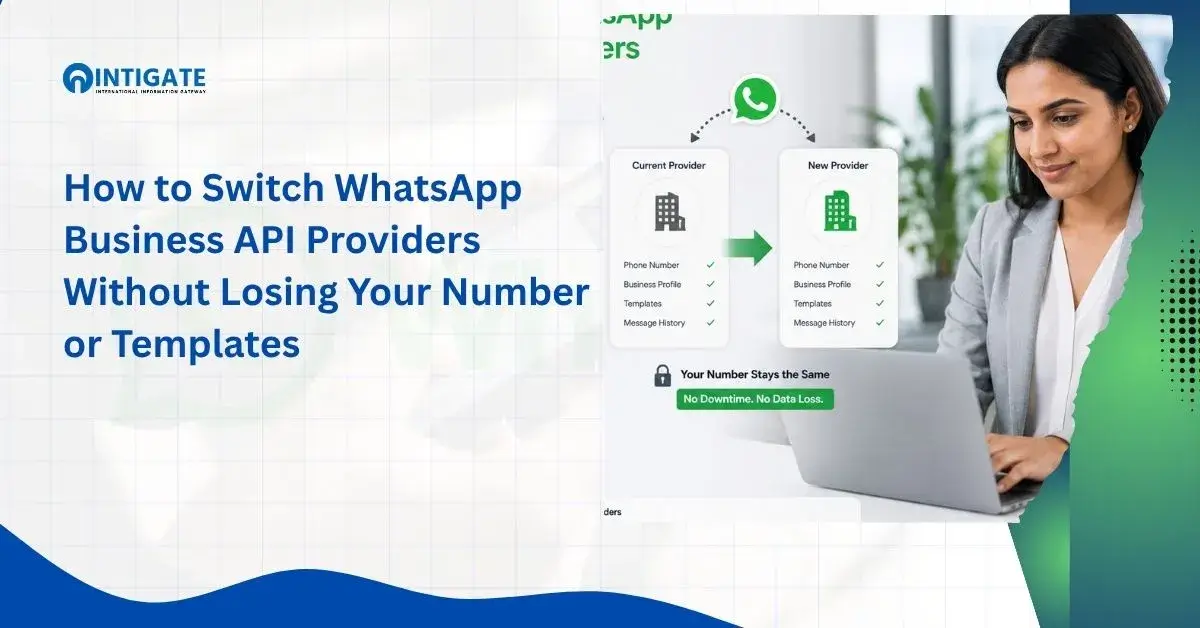
- Switching WhatsApp Business API providers does not require a new number. Your phone number, display name, quality rating, and approved templates move with a proper migration.
- Chat history does not transfer between providers, and neither do templates stuck in low-quality, rejected, or pending status.
- Two-factor authentication must be disabled on the source number before Meta will allow migration to begin.
- Learning how to switch WhatsApp Business API providers correctly means the number transfer itself takes a few hours, while template resubmission can run on Meta’s separate 24-hour review clock.
- Migration is worth the coordination cost when your current provider is unclear on pricing, slow on support, or missing features you need now.
Choosing the wrong WhatsApp Business API provider is a business problem, not just a technical one.
Slow support, unclear pricing, and platforms that cannot scale with your message volume are the most common reasons companies look into switching WhatsApp Business API providers without losing the customer conversations already running on that number.
Meta built number portability directly into the WhatsApp service provider Meta Platforms ecosystem for exactly this reason.
Your phone number, display name, quality rating, and approved templates are stored in your WhatsApp Business Account (WABA) in Meta Business Manager.
They do not live inside your current provider’s software. That is what makes switching possible without a new number.
What does not move automatically is your chat history.
Any template still marked low-quality, rejected, or pending also stays behind.
This guide covers what transfers, what to prepare before you start, how long a real migration takes, and when changing providers is actually worth the effort.
Intigate Technologies plans and executes WhatsApp Business API migrations end to end. Your templates, quality rating, and customer conversations stay intact throughout the switch.
Get a Migration Assessment →What Actually Happens When You Migrate
WhatsApp Business API migration: the process of moving a phone number and its associated WhatsApp Business Account (WABA) data from one Business Solution Provider to another, while keeping the same number active for customers.
When you migrate correctly, Meta transfers four things to the new provider. Your phone number stays the same.
Your approved display name carries over.
Your quality rating, the score Meta assigns based on message volume and customer feedback, moves with the number.
Any template already in Approved status, along with your official messaging limits, transfers as well.
Two things do not move automatically.
Your conversation history stays on the old provider’s system and is not portable.
Templates sitting in a low-quality, rejected, or pending state must be resubmitted for approval on the new platform.
Meta does not guarantee approval continuity for templates that had not cleared review before the switch.
Every WhatsApp service provider Meta certifies through the same Business Solution Provider program, so the migration rules described here apply the same way regardless of which provider you are leaving or joining.
This distinction matters for accuracy. Some providers advertise migration as “instant” or “zero-loss.” Neither claim is precise.
The number and the approved assets move, but the account is briefly reassigned during the switch, and templates still under review carry no such guarantee.
Pre-Migration Checklist
A clean migration depends on seven prerequisites completed before you contact your new provider.
The first three are the ones every provider mentions. The next three are the ones that actually cause rejected migration requests.
1. Disable Two-Factor Authentication on the Source Account: Two-factor authentication (2FA) on your current provider’s number blocks migration until it is turned off. Contact your existing Business Solution Provider and request that 2FA be disabled on the number you plan to move. This single step stops most migrations that get stuck.
2. Confirm Source WABA Is Verified and Approved. Both your current WhatsApp Business Account and the destination account need Approved status under Meta’s Commerce Policy. If your current WABA shows a pending or restricted status, resolve that first. An unverified account cannot be migrated.
3. Export Chat History Before You Start: Conversation history does not transfer between providers. Export it directly from your current platform’s dashboard, or back it up through the WhatsApp Business App if that is where the number originated, before you begin the switch.
4. Confirm the Destination WABA Sits Under Your Meta Business Portfolio. This is the step most migration guides skip, and it is the one that causes the most stalled migrations. The source and destination WhatsApp Business Accounts must belong to the same Meta Business Portfolio. If your new provider creates the destination WABA under their own Business Manager instead of yours, Meta will not complete the transfer, and you will not get a clear error message explaining why. Ask your new provider directly whether they use Embedded Signup to create the destination account inside your Business Portfolio, or inside theirs. Only the first option works for migration.
5. Confirm the Number Has No Active IVR System. An interactive voice response (IVR) system running on the number blocks migration. This catches businesses that route the same number through a call center or auto-attendant alongside WhatsApp. Disable or reroute the IVR before starting the switch.
6. Confirm a Valid Payment Method Is Attached to the Source WABA: Meta requires an active payment method on the WABA you are migrating from. A missing or expired card is a common, easily overlooked reason a migration request gets rejected before it starts.
7. Notify Your Team of the Switch Window: Agents handling live conversations should know when the migration is scheduled. Messages sent during the reassignment window may be delayed until the number reconnects on the new platform.
Why Migrations Get Stuck
Most migration failures are not caused by Meta’s process itself.
They are caused by one of the prerequisites above being wrong in a way that is not obvious until the request fails.
The most common failure is a Business Portfolio mismatch.
A new provider sets up your destination WABA inside their own Business Manager to move faster, then discovers during the transfer that Meta requires the source and destination to share a Portfolio.
At that point, the entire account has to be recreated, which erases any progress already made.
The second most common failure is a leftover IVR system.
Numbers that previously ran through a call center often still have IVR routing active on the carrier side, even after the business stopped using it actively.
This is invisible until the migration request is rejected.
The third is a payment method issue.
Card expirations are routine, but nobody checks WABA billing status until a migration fails because of it.
None of these three are Meta being difficult.
They are prerequisites the platform enforces silently, and any provider that has run migrations at volume should be checking all three before submitting a request rather than after it fails.
How Long Migration Actually Takes
A WhatsApp Business API migration typically takes a few hours from start to finish, not days.
The number reassignment itself, moving the WABA and phone number to the new provider’s Meta Business Manager connection, is usually the fastest part of the process.
What extends the timeline is template approval.
Meta’s own developer documentation states that template review can take up to 24 hours (Meta for Developers).
If any of your templates need to be resubmitted, or if you are creating new ones on the new platform, plan for that review window separately from the number switch itself.
The realistic sequence looks like this.
Disabling 2FA and confirming WABA status can happen the same day.
The number transfer itself completes within a few hours once both providers process the request.
Any template resubmission runs on Meta’s separate review clock.
No provider can promise zero downtime, and any claim of an instant, risk-free switch should be treated with caution.
What a managed migration can do is compress the coordination time between steps so the number stays unreachable for the shortest possible window.
We coordinate the entire switch for you if you would rather not manage the sequencing yourself.
What You Lose (and What Doesn’t Transfer)
Two categories of data do not survive a WhatsApp Business API migration, regardless of provider.
| Element | Transfers to new provider? | Notes |
|---|---|---|
| Phone number | Yes | Stays active throughout, no new number needed |
| Display name | Yes | Must already be in Approved status on the source WABA |
| Quality rating | Yes | Carries over exactly as it stood before the switch |
| Templates in Approved status | Yes | Migrate as-is, no resubmission needed |
| Official Business Account status | Yes | Carries over with the WABA |
| Chat history/conversation logs | No | Not portable between Business Solution Providers, export before switching |
| Low-quality, rejected, or pending templates | No | Must be recreated and resubmitted for review on the new platform |
| Third-party CRM tags, notes, or custom fields | No | These live in the old provider’s software, not in the WABA, and need manual export |
Chat history is the biggest loss for most teams.
Meta does not migrate conversation logs between Business Solution Providers.
Export that history before the switch, not after, especially if your team needs it for compliance, support continuity, or dispute resolution.
Low-quality, rejected, and pending templates are the second loss.
Only templates already in Approved status transfer with the number.
Anything still under review, previously rejected, or flagged for low quality has to be recreated and resubmitted on the new platform.
This is also true for Meta Business Verification for WhatsApp API status changes that happen mid-review.
A verification change in progress can restart the clock on associated templates.
None of this is a flaw specific to any one provider. It reflects a structural split in Meta’s infrastructure. Number-level data is portable.
Provider-hosted data is not.
A vendor claiming full chat history portability is describing something Meta’s platform does not currently support.
When Switching Is Worth It
Migration has a real cost in time and coordination. It is worth paying that cost when the switch solves a problem your current provider cannot fix.
Three criteria are worth evaluating before you commit to a new provider.
Pricing transparency: check whether conversation-based charges, markup on Meta’s per-message rates, and platform fees are disclosed clearly. Or do they only show up as surprises on the invoice?
Support SLA: a defined response time for account issues, template rejections, and API outages matters more once your message volume grows. This is especially true for teams running Bulk WhatsApp marketing service in India campaigns at scale.
Feature depth: confirm the new platform actually supports the automation, CRM integration, and agent-assignment workflows your team uses today. Do not rely on what is listed on the pricing page alone.
Your current provider might be opaque on pricing, slow on support, or missing features you need now. In any of those cases, the coordination cost of switching is usually smaller than the ongoing cost of staying.
Talk to Intigate about migrating your number if you want a straight assessment of whether a switch makes sense for your account.
Conclusion
The technical steps for switching WhatsApp Business API providers are well documented.
What actually causes migrations to fail is different: a mismatched Business Portfolio, a leftover IVR system, or an expired card on the WABA.
Checking all three before you submit a migration request is the difference between a same-day switch and a multi-day one spent troubleshooting a rejected request.
Preparation determines the outcome here more than the provider you choose does.
FAQ’s
Will my customers notice the switch?
Customers should not notice. Your phone number, display name, and chat interface all stay the same. The one visible risk is a short window during number reassignment, usually a few hours, when new messages may be delayed until the transfer finishes on the new platform.
Do I need a new phone number to switch WhatsApp Business API providers?
No. Meta’s migration process is built specifically to keep your existing number active on the new provider. You only need a new number if you are launching a second WhatsApp Business Account alongside your current one, not when replacing your existing provider.
What happens to in-progress conversations during migration?
Active conversations continue once the switch completes. The number and its active 24-hour customer service window both carry over. Messages sent during the reassignment period, usually a few hours, may be delayed rather than lost. They arrive once the number reconnects on the new platform.
How much does it cost to switch WhatsApp Business API providers?
Cost depends on the new provider’s pricing model and whether you use managed migration support. Most Business Solution Providers do not charge separately for the Meta-side number transfer itself. Fees vary widely by platform, so request a written cost breakdown before you commit to a provider.
Why did my WhatsApp API migration get rejected?
The most common cause is a Business Portfolio mismatch. Your destination WABA must sit under your own Meta Business Portfolio, not the new provider’s. An active IVR system on the number or an expired payment method on the source WABA are the next two most common causes.