WhatsApp Business API for Small Businesses: The Complete 2026 India Guide
- The WhatsApp Business API is a paid, developer-grade messaging platform accessed only through a Meta-authorized Business Solution Provider (BSP), not the free WhatsApp Business App.
- Meta charges per delivered template message (not per conversation) since July 1, 2025, and revised several country rate cards, including India’s, again on January 1, 2026.
- New WhatsApp business portfolios start with a messaging limit of 250 unique users per day, not the older 1,000/10,000/100,000 tier structure many guides still describe; Meta deprecated that field.
- Most Indian small businesses, including sole proprietors, qualify using GST, Udyam, or PAN-based documentation, without needing a private limited company.
- Businesses remain responsible for their own DPDP Act, 2023 compliance around consent and opt-outs; the API is the channel, not the legal cover.
The WhatsApp Business API for small businesses stops being optional the moment a single WhatsApp Business App account can no longer support your team.
That threshold usually shows up as a specific, annoying moment: two people trying to reply from the same number, a customer asking for an order update that has to be typed out by hand for the two-hundredth time, or a broadcast list you’re afraid to message because the app has no real safeguard against a ban.
This guide covers what the API actually is, what it costs under Meta’s current per-message pricing model, who qualifies in India, and how to get access through a WhatsApp Business service provider.
It also covers messaging limits, verification, DPDP Act obligations, and how to evaluate a provider before committing, using figures pulled directly from Meta’s developer documentation rather than recycled from other guides.
Compare your current WhatsApp workflow against what an official Meta Business Partner platform handles for you, from broadcasts to compliance.
Talk to a Meta Business Partner →What Is the WhatsApp Business API, and Do You Actually Need It Yet?
WhatsApp Business API: a messaging interface that lets a business send and receive WhatsApp messages programmatically across multiple agents and automated workflows, instead of through a single phone-based app.
The API has no chat interface of its own.
You access it through a BSP’s dashboard, or by integrating the underlying Cloud API directly into your own CRM or support software if you have engineering resources.
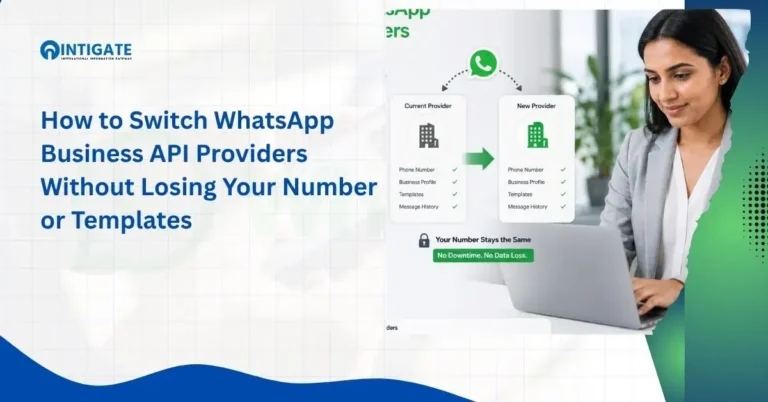
This distinction matters operationally: a business can’t run WhatsApp Business App and the API on the same number at the same time, and once you migrate a number to the API, that number’s future message history lives in your BSP’s dashboard or your own systems, not in the phone’s local WhatsApp app.
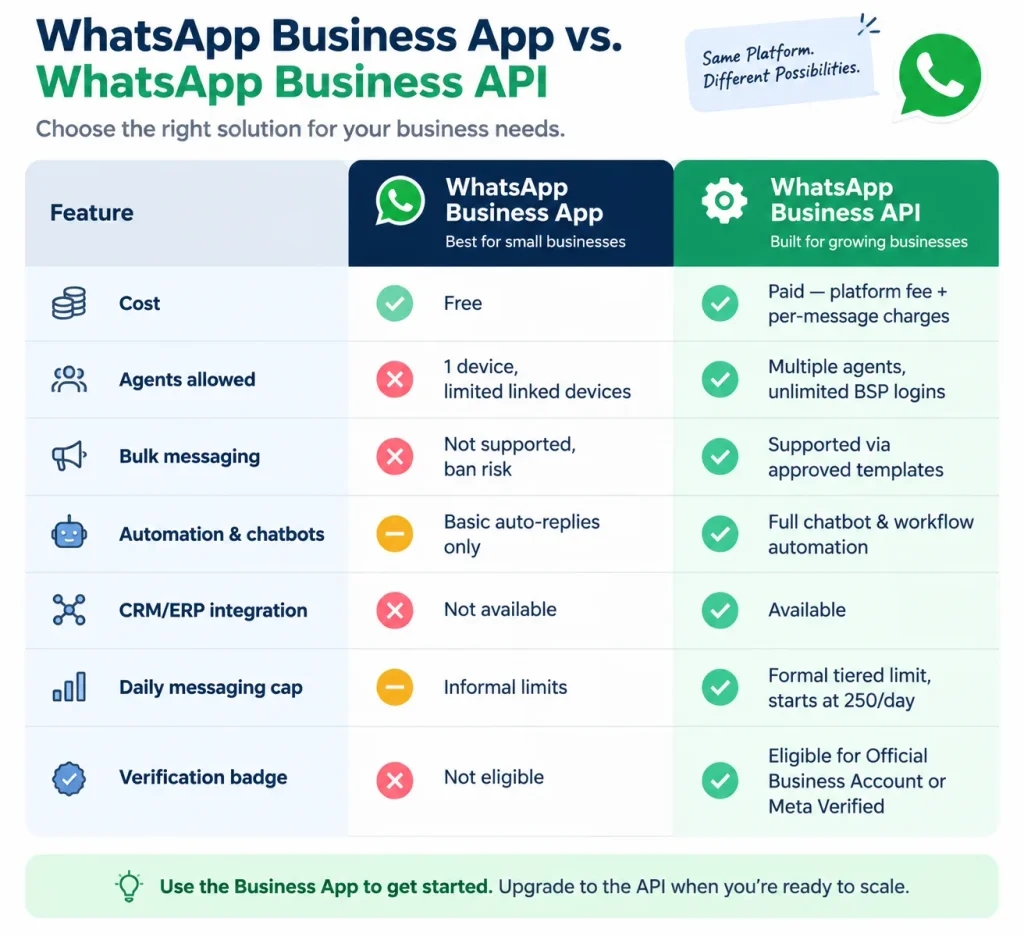
WhatsApp Business App vs. WhatsApp Business API
| Feature | WhatsApp Business App | WhatsApp Business API |
|---|---|---|
| Cost | Free | Paid (BSP platform fee + Meta per-message charges) |
| Agents allowed | 1 device, limited linked devices | Multiple agents, unlimited logins via BSP |
| Bulk messaging | Not supported, risks a ban | Supported through Meta-approved templates |
| Automation and chatbots | Basic auto-replies only | Full chatbot and workflow automation |
| CRM/ERP integration | Not available | Available |
| Daily messaging cap | Practical, informal limits | Formal tiered limit, starts at 250/day, scales with quality |
| Verification badge | Not eligible | Eligible for Official Business Account or Meta Verified |
Signs Your Business Has Outgrown the Free App
- More than one person needs to handle WhatsApp conversations at the same time.
- You’re manually retyping the same order update, reminder, or confirmation to many customers.
- You want a chatbot answering FAQs or qualifying leads outside business hours.
- You need WhatsApp connected to your CRM, e-commerce platform, or booking system.
- You’ve hit the app’s practical ceiling on linked devices or broadcast list size.
A useful gut check: if you can count on one hand how many WhatsApp conversations you handle in a busy day, the free app is probably still fine. Once that number needs a second person to manage, the API conversation becomes worth having.

How Much Does the WhatsApp Business API Cost in India?
WhatsApp Business API pricing in India has two layers billed separately: a monthly platform fee from your BSP, and Meta’s own per-message charges for template messages sent outside a free customer service window.
Meta’s Per-Message Pricing Model, Explained
Meta retired conversation-based billing and moved to per-message pricing for Marketing, Utility, and Authentication template categories, effective July 1, 2025.
Businesses are now charged per delivered template message rather than per 24-hour conversation window (Meta for Developers, Business Messaging Pricing Documentation).
What stays free: any free-form reply sent within an open 24-hour customer service window, which opens when a customer messages you first. Utility templates sent inside that same window are also free.
What’s billed: marketing templates are billed on every delivery, regardless of whether a service window is open.
Authentication templates are billed per delivery.
Utility templates are billed only when sent outside an open service window.
Example scenario, walked through: a customer messages your business at 10:00 AM. A free-form reply at 10:05 AM is free.
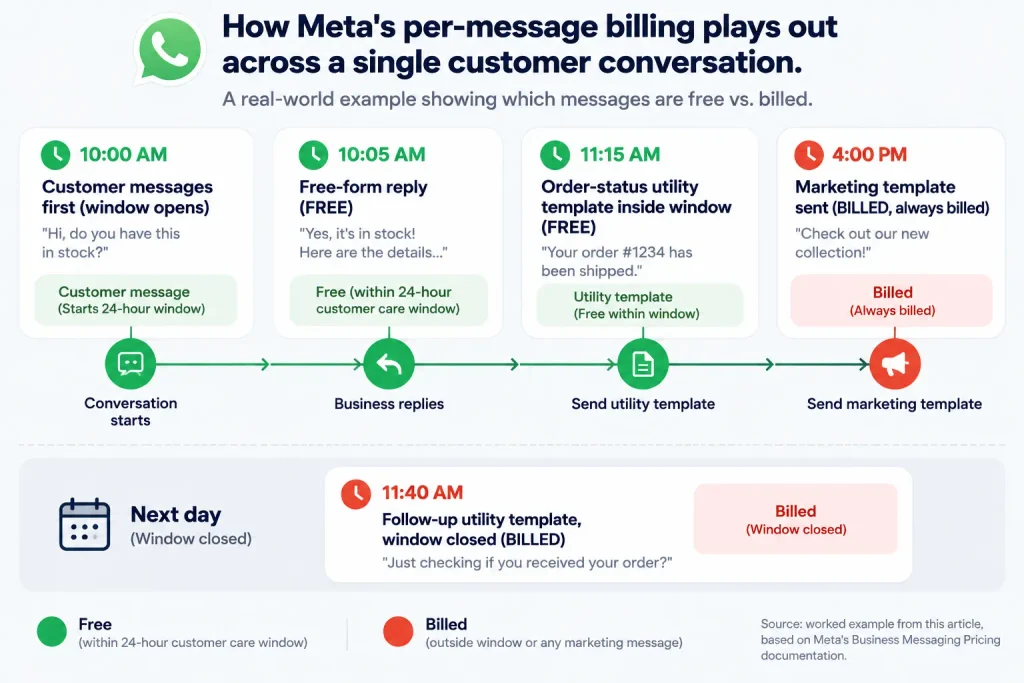
An order-status utility template sent at 11:15 AM, still inside the open window, is also free.
A marketing template sent to that same customer at 4:00 PM is billed, because marketing is always billed.
If you send a follow-up utility template the next day at 11:40 AM with no reply from the customer since yesterday, that message is billed too, because the service window has closed.
Meta revised several country rate cards again effective January 1, 2026, including an increase to India’s marketing message rate.
Multiple WhatsApp platform providers report the revised India marketing rate at approximately ₹0.86 per message, though this figure comes from third-party platforms rather than Meta’s own published number, so confirm the live rate on Meta’s official rate card before budgeting.
Rate cards can change with notice periods ranging from one to six months depending on the type of update.
BSP Platform Fees vs. Meta’s Message Charges
These are billed separately, and both apply. The BSP platform fee covers your dashboard, automation tools, team inbox, and support.
Meta’s message charges are passed through by the BSP at Meta’s published rate, though your effective per-message cost can run meaningfully higher than Meta’s base rate depending on how much markup your BSP adds on top.
When comparing providers, ask for both numbers broken out separately, not just the headline platform fee.
If cost is your primary constraint, see our breakdown of the Cheapest WhatsApp API options for small teams.
Worked Example: Estimating a Monthly Bill
Monthly cost = BSP platform fee + (billable template messages × applicable per-message rate for that category and country)
A small business sending mostly utility messages inside open service windows, plus a smaller batch of marketing broadcasts, pays its BSP’s platform fee plus charges only for the marketing sends and any utility messages that land outside the free window.
A business running frequent, large marketing broadcasts to a cold list will see marketing charges dominate the bill, since that category has no free-window exemption.
This is why message mix, not just message volume, is the real cost driver, and why two businesses sending the same number of total messages can end up with very different invoices.
Is Your Business Eligible? Documents and Requirements for Indian SMBs
Eligibility for the WhatsApp Business API in India is based on completing Meta Business Verification, not on company size, turnover, or years in operation.
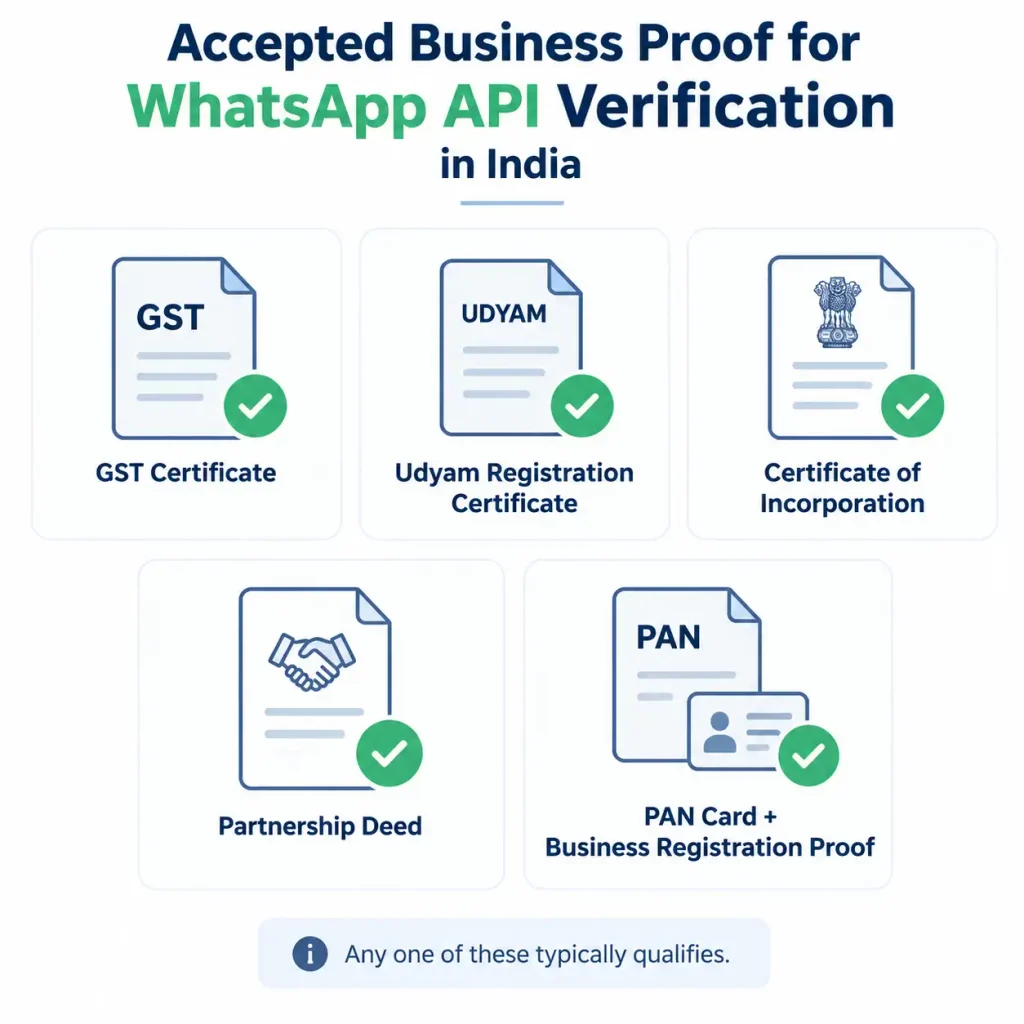
Accepted Business Proof
Indian businesses commonly complete verification using one of the following, depending on registration status:
- GST Certificate
- Udyam Registration Certificate
- Certificate of Incorporation
- Partnership deed
- PAN card together with proof of business registration
Document requirements can be updated by Meta, so confirm the current accepted list inside Meta Business Manager’s Security Center before applying.
Do Sole Proprietors and Unregistered Businesses Qualify?
Yes. A registered private limited company is not a prerequisite.
Sole proprietors, partnerships, and businesses without formal incorporation can typically complete verification using GST, Udyam, or PAN-based documentation, provided the business name and details match exactly across every document submitted.
A mismatched business name between your GST certificate and your WhatsApp display name is one of the most common causes of a rejected or delayed application, so check this before you apply, not after a rejection notice.
How to Get WhatsApp Business API Access: Step-by-Step Setup
Business Solution Provider (BSP): a company authorized by Meta to give businesses access to the WhatsApp Business API, since Meta does not sell API access directly to individual small businesses.
Platform-First vs. API-First vs. CRM-Native BSPs
- Platform-first BSPs provide a ready-made dashboard with a team inbox, broadcasts, and a chatbot builder, suited to small businesses without a development team.
- API-first BSPs expose raw API access for engineering teams building custom integrations.
- CRM-native BSPs bundle WhatsApp messaging inside an existing CRM or helpdesk product you already use.
A simple decision heuristic: if your business has no in-house developer, a platform-first BSP will get you live faster and keep ongoing maintenance off your plate.
If you have engineering resources and want WhatsApp deeply embedded in a custom system, an API-first BSP avoids paying for dashboard features you won’t use.
Setup Timeline: What Happens After You Apply
- Create or verify a Meta Business Manager account for your business.
- Submit business verification documents, such as GST or Udyam registration.
- Choose and sign up with a BSP, then connect your WhatsApp number.
- Migrate an existing number if needed, or register a new one. Note that migrating an existing number disconnects it from the WhatsApp Business App; back up anything you need from that app before migrating, since the API doesn’t carry over the phone-based chat history.
- Get your first message templates approved by Meta.
- Go live with your team inbox, automation, and broadcast tools.
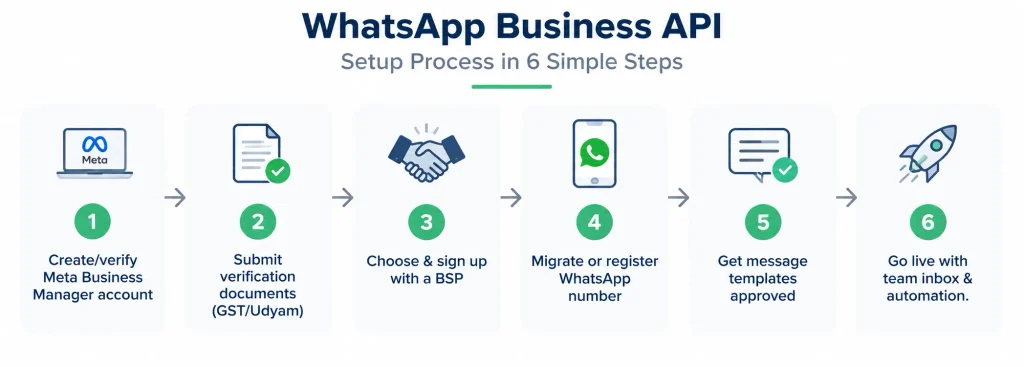
Setup commonly takes a few business days from document submission to an active account.
The most common delay isn’t the BSP’s onboarding process; it’s business verification taking longer than expected because of a documentation mismatch, so get your business name, address, and category consistent across GST, Meta Business Manager, and your WhatsApp display profile before you submit anything.
What Are WhatsApp’s Messaging Limits, and How Do They Actually Scale?
WhatsApp messaging limit: the maximum number of unique WhatsApp users your business can message outside an open customer service window within a rolling 24-hour period, set and tracked at the business portfolio level.
This is one of the areas where most existing guides are out of date.
Meta’s current documentation states that newly created business portfolios start with a messaging limit of 250 unique users per 24 hours, not the older 1,000/10,000/100,000 tier figures that many older articles still cite (Meta for Developers, Messaging Limits documentation).
Meta has since deprecated the field that used to report a flat “tier,” replacing it with a portfolio-level limit.
From that 250 starting point, the limit can scale to 2,000 by either completing standard business verification or by sending 2,000 delivered messages to unique users outside a service window within 30 days, using templates with a high quality rating.
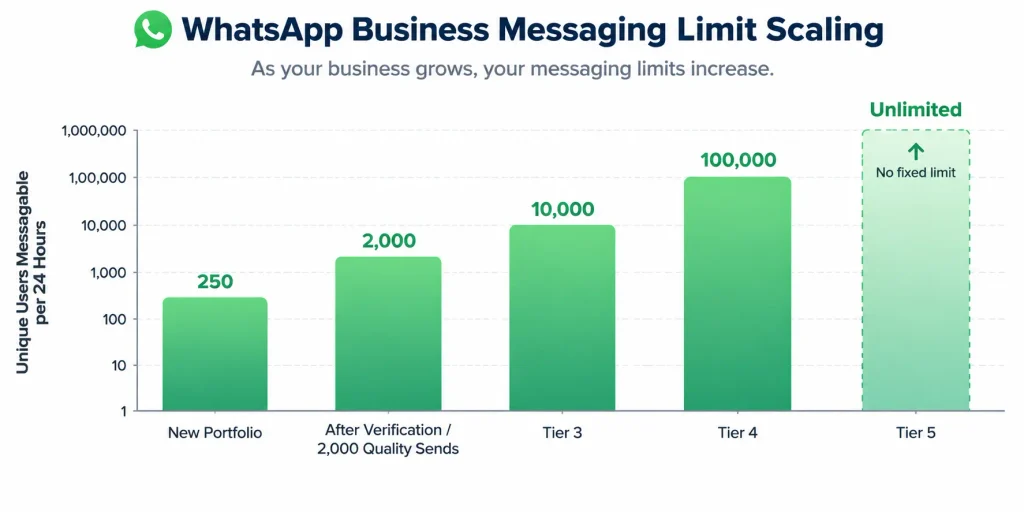
From 2,000, Meta can automatically scale a business further to 10,000, then 100,000, then unlimited, based on ongoing message quality.
Meta controls these increases; you cannot manually request one, and neither can your BSP.
An operational detail most small businesses miss: this limit is set at the business portfolio level, not per individual phone number.
If your portfolio has multiple WhatsApp numbers, they share one messaging-limit pool, meaning one high-volume campaign on one number can consume capacity that another number in the same portfolio needs that day.
Quality Rating: The Metric That Controls Everything Above
Quality rating is assigned per business phone number and per template, and it’s what determines whether your messaging limit can scale up, not just whether a message gets delivered.
It’s rated High, Medium, or Low, based on signals like block rates and negative feedback on recent messages.
If a number’s rating drops to Low, or the number is flagged, Meta gives a 7-day window to recover the rating before reducing the messaging limit to the next tier down (Meta Business Help Center, About Your WhatsApp Business Phone Number’s Quality Rating).
In practice, this means quality rating isn’t a one-time setup concern; it’s an ongoing operational metric that should be checked the same way you’d check email deliverability, because a rating drop can quietly shrink your daily reach even after you’ve scaled up.
WhatsApp Green Tick vs. Blue Tick Verification: What Small Businesses Should Know
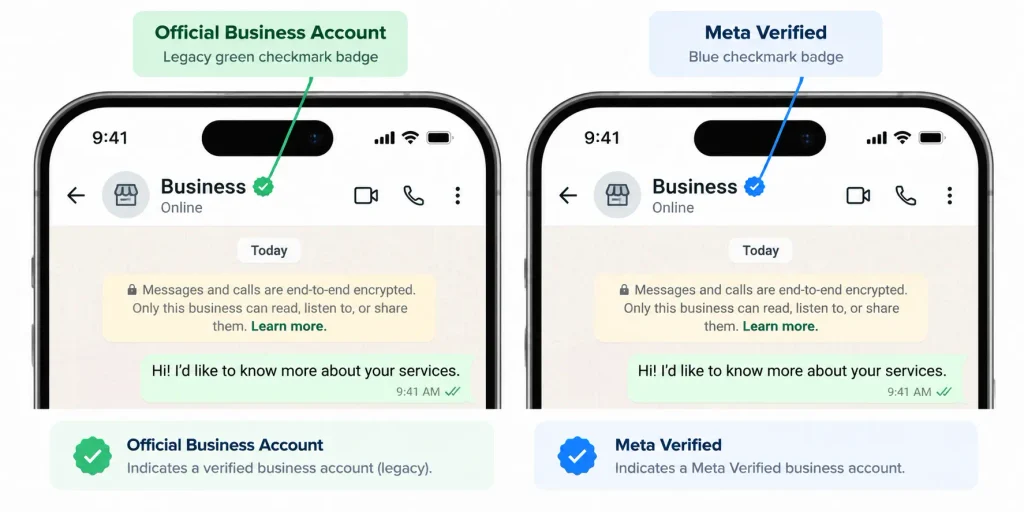
WhatsApp verification badge: a badge next to a business name confirming Meta has reviewed and recognized the account as an authentic, notable business. It does not affect your messaging limit or delivery rates.
Meta has been shifting its verified badge color from green to blue as part of the broader Meta Verified rollout across Facebook, Instagram, and WhatsApp.
Two distinct paths currently exist, so any source describing only one of them is giving you half the picture.
| Official Business Account (Green/legacy badge) | Meta Verified for WhatsApp (Blue badge) | |
|---|---|---|
| Cost | Free | Paid subscription |
| Basis for approval | Meta’s discretionary assessment of business notability and public presence | Defined subscription eligibility path |
| Approval difficulty | Selective, no guaranteed path | More predictable, tied to the paid tier |
| Requires | WhatsApp Business API, verified Meta Business Manager, two-step verification | WhatsApp Business API, active subscription |
Common Reasons Verification Applications Get Rejected
- Business name is inconsistent across WhatsApp, Meta Business Manager, and registration documents.
- The WhatsApp number is new, with limited message history.
- Message quality rating is below Meta’s required threshold.
- Insufficient public presence or documentation to establish business authenticity.
- Recent policy violations on the WhatsApp account or linked Meta properties.
Is the WhatsApp Business API DPDP Act Compliant? What You Must Set Up Yourself
DPDP Act, 2023: India’s Digital Personal Data Protection Act, which sets requirements for how businesses collect, use, and manage consent for personal data, including phone numbers used for WhatsApp messaging.
The API itself is a messaging channel. It does not automatically make your business DPDP compliant.
Compliance depends on how you implement consent capture, message content, and opt-out handling on top of the platform, and it’s your responsibility, not your BSP’s, even if your BSP provides tooling to help.
Treat this as shared responsibility and consult a data protection advisor for your specific use case rather than relying on a BSP’s default settings.
Opt-In Consent and Opt-Out Flows That Satisfy DPDP Requirements
- Capture explicit opt-in consent before sending marketing messages, not just utility or transactional ones.
- Record when and how consent was given, so it can be demonstrated if requested.
- Provide a clear, working opt-out mechanism in every marketing message.
- Honor opt-outs immediately across all future campaigns, not just the current one.
- Avoid messaging phone numbers obtained without direct consent from the customer, including numbers scraped or purchased from third parties.
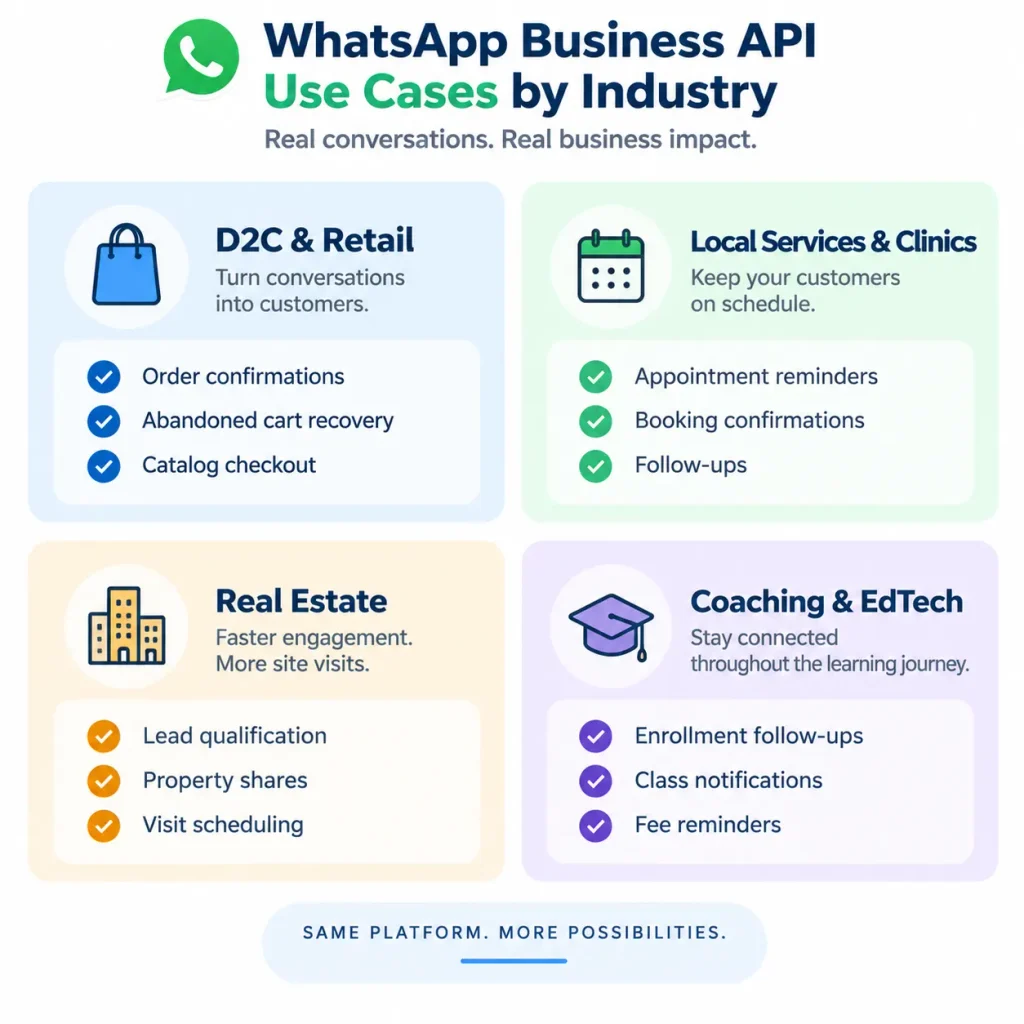
What Can a Small Business Actually Do With the API? Real Use Cases by Industry
D2C & Retail
Order confirmations, shipping updates, abandoned cart recovery, and catalog-based checkout inside WhatsApp are the core use cases here. Businesses running frequent promotional campaigns need to send bulk messages on WhatsApp through approved templates rather than manual broadcasts, both to stay within policy and to avoid the marketing-category charges that apply on every send.
Local Services & Clinics
Appointment reminders, booking confirmations, and post-visit follow-ups reduce no-shows through automated, timed messages sent as utility templates, which keeps most of this traffic inside the free-window exemption if timed against the patient’s last message.
Real Estate
Automated lead qualification, property detail and pricing shares, and site-visit scheduling remove manual back-and-forth from a high-volume, low-margin-per-lead workflow.
Coaching & EdTech
Enrollment follow-ups, batch and class notifications, and fee payment reminders go out to large groups of students or parents at once, where the messaging-limit and quality-rating mechanics above become directly relevant at scale.
Choosing a WhatsApp Business API Provider: What Actually Matters for a Small Business
A Practical Checklist
- Onboarding support: does the BSP actively help with document verification and template approval, or leave you to figure it out alone?
- Pricing transparency: are platform fees and Meta’s per-message charges, including any markup, shown separately and clearly?
- Messaging limit visibility: does the platform show your current portfolio-level limit and quality rating, or only your message volume?
- Compliance tooling: does the platform support opt-in capture and opt-out handling relevant to DPDP requirements?
- Integration support: can the platform connect to your CRM, e-commerce store, or booking system without custom development?
- Verification guidance: can the provider help you apply for Official Business Account or Meta Verified status correctly the first time, given how common name-mismatch rejections are.
For a side-by-side look at providers against this checklist, see our guide to the best WhatsApp Business Solution Provider options for Indian small businesses.
Intigate Technologies is an official Meta Business Partner supporting Indian small businesses through setup, verification, and DPDP-aligned messaging workflows.
Get Started with an Official Meta Business Partner →Conclusion
The WhatsApp Business API is a practical upgrade for small businesses once a team outgrows the free app, not a requirement from day one.
The decisions that actually matter are understanding the two-part, per-message pricing structure, confirming your documentation for Meta Business Verification, knowing your real messaging limit starting point (250, not the outdated 1,000 figure), and building consent and opt-out flows that satisfy the DPDP Act before you scale volume.
Verification badges and provider features matter, but they come after these fundamentals are in place.
Meta continues to revise both pricing and messaging-limit mechanics, most recently in January 2026, so small businesses that check current rates and limits directly against Meta’s own documentation, rather than an older guide, will avoid both billing surprises and messaging-limit surprises.
Frequently Asked Questions
What is the WhatsApp Business API for small businesses?
It’s a paid, developer-grade version of WhatsApp that lets businesses send and receive messages at scale, across multiple agents, with automation and CRM integration. It’s accessed through a Meta-authorized BSP, unlike the free WhatsApp Business App, which is limited to one device and manual use.
What does the WhatsApp Business API typically cost a small business in India?
Costs have two parts: a monthly BSP platform fee, and Meta’s per-message charges for marketing, utility, and authentication templates sent outside a free service window. Meta revised India’s marketing rate again on January 1, 2026, so confirm current figures with your BSP and Meta’s live rate card.
What is the WhatsApp messaging limit for a new business?
New business portfolios start at 250 unique users per 24 hours. This can scale to 2,000 through verification or high-quality template sending, then automatically to 10,000, 100,000, and unlimited, based on Meta’s ongoing quality assessment. The limit is shared across all numbers in one business portfolio.
Do I need GST registration to get the WhatsApp Business API in India?
Not necessarily. Businesses can typically complete Meta Business Verification using GST, Udyam Registration, a Certificate of Incorporation, a partnership deed, or PAN with business registration proof, depending on their business structure.
How is the WhatsApp Business API different from the WhatsApp Business App?
The App is free, single-device, and manual. The API is paid, supports multiple agents and automation, and requires a BSP for access. The API also supports CRM integration and bulk, template-based messaging, which the App does not, and it has a formal, scalable messaging limit rather than informal app-level caps.